

Start from your sport, not from a blank page
Judo, ju-jitsu, karate, taekwondo, BJJ, wrestling and more: one tap creates your federation's belts, age classes, weight ladders, disciplines and techniques.
The app in use, recorded.
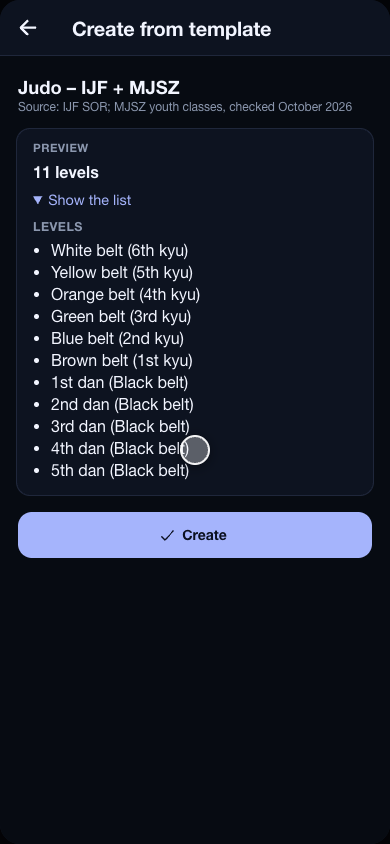
A new club does not start by typing in forty weight classes. The template picker opens with the club, and on every page it can fill — levels, age groups, weight groups, disciplines, exercises — a button brings it back. Search for a sport or a federation, open one, and see exactly what it would create before you press Create.
What a template brings
The belts in order, named the way the dojo says them — “Yellow belt (5th kyu)”, “1st dan (black belt)” — with the stripe on the two-coloured ones. The federation’s age classes and the weight ladder for each of them, by sex. The disciplines it competes in. And the sport’s real techniques for the Exercises page, grouped by family, with the forms that belong to a grade arriving with that grade.
Which ones there are
Judo (IJF and the Hungarian youth classes), ju-jitsu (JJIF, from U8 to adults), karate (WKF), Kyokushin (WKO), taekwondo (WT and ITF), kickboxing (WAKO tatami and ring), Muay Thai (IFMA), BJJ (IBJJF), wrestling (UWW freestyle and Greco-Roman), sambo, MMA, boxing, wushu sanda, and the non-competitive arts — aikido, kendo, krav maga. Every template names its source and the month it was last checked against it.
Yours afterwards
A template is a starting point, not a lock: what it created is the club’s own to rename, reorder or delete. Applying it again creates only what is missing, so nothing is ever doubled.